Introduction
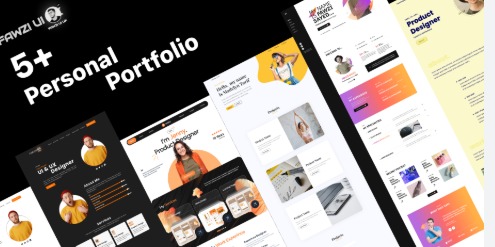
A few years ago, portfolios were mostly used by designers, photographers, or people working in creative and tech fields. But today the job market has changed. Employers want to see real examples of your work before they hire you. They don’t want only a resume. They want to know what you can actually do even from non-tech roles.
This is why portfolios have become important for non-tech roles as well. Whether you work in marketing, HR, sales, operations, customer service, content writing, or management, a portfolio can increase your chances of getting selected. It shows your confidence, your skills, and your achievements in a clear and practical way.
In this article, we will learn how to prepare a strong portfolio even if you are a beginner or don’t have work experience. I will also guide you step-by-step so you can build a clean, simple, and professional portfolio that helps you stand out.
What Is a Non-Tech Portfolio?
A non-tech portfolio is a digital or physical collection of your professional work. It includes your best samples, achievements, skills, and small case studies. It supports your resume by showing real proof of your abilities.
For example:
● A marketing portfolio may include campaign ideas, content samples, or strategies you created.
● An HR portfolio may include onboarding plans, interview questions you designed, or employee engagement ideas.
● A sales portfolio may include pitch samples, conversion results, or customer communication examples.
A portfolio is not just a collection of work. It is a presentation of who you are and what you can offer to a company.
Why Non-Tech Roles Also Need Portfolios?
Many people believe portfolios are only for technical or creative roles. But employers today want more clarity. They want to see your working style, how you solve problems, and how you think.
A portfolio helps in many ways:
● It makes your application stronger than others.
● It shows that you are serious about your career.
● It helps employers trust your skills.
● It supports your resume with real evidence.
● It gives you confidence during interviews.
Because of this, more non-tech roles are asking for portfolios every year.
Identify the Purpose of Your Portfolio
Before you start making the portfolio, ask yourself one simple question:
“What job role am I preparing this portfolio for?”
The answer decides everything else—what samples you include, how you design your portfolio, and how you present your achievements.
Different roles need different types of material.
Here are some examples:
For Content Writing
● Blog posts
● Social media content
● Email samples
● Product descriptions
For Marketing
● Campaign ideas
● Social media strategies
● Ads you created
● Insights or performance results
For HR
● Hiring plans
● Training modules
● Employee engagement ideas
● Policies you drafted
For Customer Service
● Chat or email samples
● Problem-solving examples
● Customer feedback
For Sales
● Sales pitches
● Closing scripts
● Lead conversion results
● Follow-up communication
For Operations or Management
● Process charts
● Work improvement ideas
● Task management samples
● Project coordination examples
Once you know your purpose, your portfolio becomes more focused and powerful.
Choose the Right Format for Your Non-Tech Portfolio
There are many ways to build a portfolio. You need to choose one based on your comfort level and what looks best for your work.
- Online Portfolio Website
Best for professionals who want a long-term presence.
Use free tools like:
● WordPress
● Google Sites
● Notion
● Canva Websites
These are beginner-friendly and easy to update.
- PDF Portfolio
Simple format for applying to jobs through email or job portals.
You can make it using:
● Canva
● Google Docs
● MS Word
PDF portfolios are easy to share and look clean.
- Presentation-Based Portfolio (PowerPoint or Canva)
Good for freshers and people with few samples.
You can create a neat slide deck with 8–15 slides.
- LinkedIn Featured Section
If you don’t want to build a full portfolio, add your samples in the “Featured” section on LinkedIn. This is easy and looks professional.
Choose whatever is easiest for you to maintain. A portfolio should be simple and clear—not heavy or complicated.
What to Include in a Non-Tech Portfolio?
Most non-tech portfolios follow a similar structure. Here’s what you must include:
1. About Me Section
Write a small introduction.
Keep it natural. Include:
● Your background
● Your interests
● Your strengths
● What kind of work you enjoy
This gives employers a quick picture of who you are.
2. Skills Section
List your relevant skills clearly.
Examples:
● Communication
● Content creation
● Customer handling
● Team collaboration
● Problem-solving
● Strategy making
Avoid listing random skills you don’t use.
3. Work Samples
This is the heart of your portfolio.
Include real examples from your work or practice.
If you are a beginner, you can create mock samples.
For example:
● Create a social media post for a brand
● Write a sample email campaign
● Make a small HR hiring plan
● Create a sample presentation for a sales pitch
Even practice samples show your thinking and your effort.
4. Achievements Section
Include any awards, recognition, certificates, or results.
Even small achievements count.
Examples:
● Completed 20+ writing assignments in college
● Managed a team event for 200 students
● Improved customer satisfaction by 25%
● Increased engagement on a college page
Try to add numbers—they make your work look stronger.
5. Testimonials or Feedback
If you received good feedback from clients, teachers, seniors, or anyone you worked with, add screenshots or short quotes.
It builds trust.
6. Contact Details and Social Links
Always add:
● Email
● Phone number (optional)
● LinkedIn profile
● Portfolio link
Many candidates forget this, and employers cannot contact them easily.
How to Present Your Non-Tech Skills Through Real Examples?
A strong portfolio uses examples, not long descriptions.
Here’s how you can do it:
● Before and After Style
Show what the problem was and how you solved it.
Example:
Before: Social media page had low engagement
After: You created a plan that improved engagement by 40%
● Small Case Studies
Write 4–5 lines about:
● What you did
● Why you did it
● What happened after
● Screenshots
Screenshots give instant clarity and proof.
● Short Notes or Explanations
Don’t add long paragraphs.
Keep it clean and simple.
How to Build a Non-Tech Portfolio With Zero Experience?
This is the biggest fear for beginners.
But the truth is—you don’t need a job to create a portfolio.
Here are easy ways to build one:
- Create Practice Samples
Make samples for imaginary companies or real brands.
No one asks whether they were paid projects.
- Use College Work
Assignments, projects, presentations—all can be included.
- Do Volunteer Work
Help a friend, NGO, small business, or local shop.
- Do Small Freelance Tasks
Even one or two small gigs can give you good samples.
- Build Personal Projects
Start a blog
Create social media posts
Write newsletters
Make marketing plans
These all count as portfolio-worthy work.
Tools to Create a Free Non-Tech Portfolio
You don’t need money to build a strong portfolio.
These free tools are more than enough:
- Canva
Best for PDF portfolios and presentations.
- Google Sites
Very simple online portfolio builder.
- Notion
Clean, modern, and easy to organize.
- Google Docs & Slides
Good for beginners who want a quick start.
- WordPress (Free plan)
Useful if you want a long-term personal website.
- LinkedIn Featured Section
Perfect for quick portfolio building.
Choose whichever you feel comfortable with.
Know more about how to create professional portfolio through our guide.
Common Mistakes to Avoid in a Non-Tech Portfolio
Most candidates make mistakes that reduce the quality of their portfolio. Avoid these:
● Using too much text
● Adding irrelevant samples
● Using a messy design
● Not explaining the purpose of a sample
● Not adding contact details
● Adding too many pages
● Uploading low-quality images
● Not updating old work
A clean and simple portfolio always looks better.
Conclusion
A portfolio for non-tech roles is one of the best ways to show your skills and stand out in a competitive job market. It doesn’t matter if you are a fresher or an experienced professional—your portfolio tells your story in a powerful and practical way.
You don’t need expensive tools or complicated designs. All you need is clarity, real examples, and a simple presentation. Once you prepare your portfolio, you will notice that recruiters take you more seriously. It boosts confidence and increases your chances of getting shortlisted.
Start small, keep it clean, and build step-by-step. A good portfolio is not created in one day, but it becomes better with regular updates.
Want to read more informative blog? Click here.
Leave a Reply