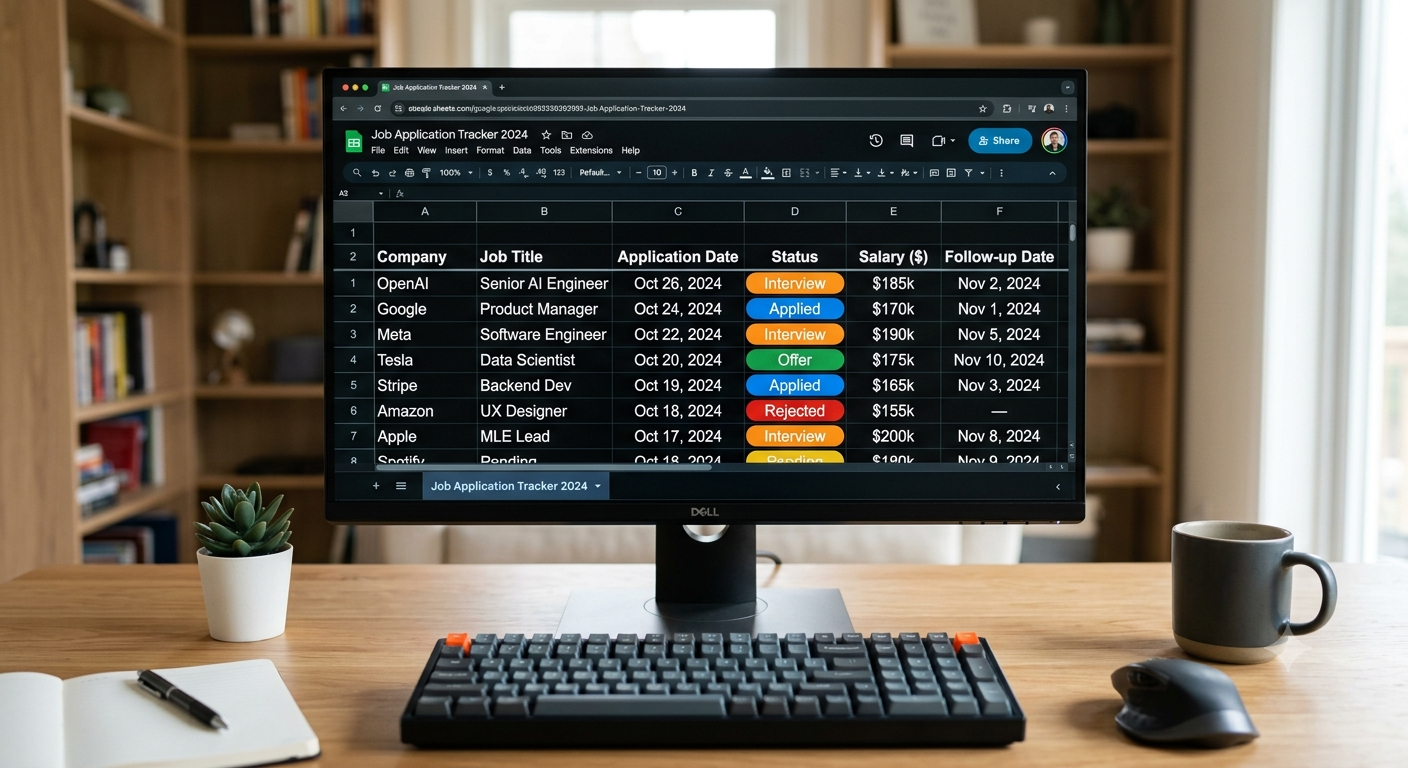
Introduction: Job Application Tracker
Searching for a job can be a daunting task when you apply to so many companies, go through numerous interviews, and wait patiently to hear back from so many recruiters. However, if you create a tracker for all of your job applications, it will make your life so much easier. A Job Application Tracker is a valuable tool to help organize your job search.
By putting them in a google sheet, you can track what companies you applied to, what jobs you applied for, when you applied, when you interviewed, and where you are in the process. This tracker is important to have because it allows you to see how far along you are in your applications and focus on the jobs that are most important to you. A Job Application Tracker in Google Sheets helps you organize job applications, track opportunities, and manage your job search efficiently, whether you’re a fresher or an experienced professional.
How to Build a Job Application Tracker in Google Sheets?
1. Create a New Google Sheet
The first step to building your Job Application Tracker will be to create a blank spreadsheet. Name your sheet something relevant such that you know the purpose of the document every time you open it.
Create a header for every piece of information that you need to enter. Add columns for company name, job title, location, application date, job portal, status, interview date, recruiter details, follow-up date, and job link to keep everything organized in one sheet. Having a spreadsheet where you can enter all the essential information pertaining to your job applications will certainly help you stay organized.
2. Enter Important Job Application Details
Enter each job’s company name, title, location, application date, and the portal or source where you found the opportunity.
A job application tracker helps you organize and monitor applications across different companies. You may also include the following information in your Job Application Tracker:
- The salary that the company is offering
- The skills and qualifications required for the job
- The experience needed for the job
Say, for instance, you apply to five different content writing jobs in different companies. Having a tracker will help you figure out which of these five job applications require the same skill set and experience. It will also help you keep track of which job application promises the best career growth in terms of salaries and other benefits.
3. Use Dropdowns to Enter Application Status
Google Sheets dropdowns make it easy to track your application status across companies. Create a dropdown list to select application statuses quickly and consistently without typing them manually. The most common application statuses are Applied, Under Review, Interview Scheduled, Assessment Pending, Rejected, and Offer Received.
Choose the cell where you want to add your application status, click on Format or Data (depending on the interface of Google Sheets that you are using), and select dropdown. From here, you can add the application statuses that you need. Once you are done, click on Save.
The Job Application Tracker that you have built will now enable you to enter these statuses with a simple click of a mouse. Using this feature will also help you categorize the job applications that you have made. For instance, if a recruiter asks for an interview, you can update your application status from ‘Applied’ to ‘Interview Scheduled’.
4. Use Conditional Formatting to Highlight Important Information
Color-coding your application statuses will make it much easier for you to distinguish between one application and the other. To do this, select the application status column and choose Format followed by Conditional formatting. From here, you will be able to set the conditions for highlighting different application statuses in different colors.
For instance, you can choose to highlight the cells containing ‘Under Review’ in blue, highlight the cells with ‘Offer Received’ in green, and highlight the cells with ‘Rejected’ in red. You can even choose a color to highlight cells with an interview date so that you can keep track of the interviews that you have scheduled.
Once you have set the conditions for highlighting cells in different colors, you will be able to see all the details that you need in one place without having to scrutinize the entire spreadsheet. This will save you a lot of time and effort, especially when your spreadsheet contains a ton of job applications.
5. Filter and Sort Your Job Applications
If you have a lot of applications to keep track of, sifting through your spreadsheet to find a specific job application can be time-consuming. However, you can easily sort and filter your job applications in Google Sheets. Go to the Data tab and click on the filter icon. This will add a filter to your spreadsheet so that you can view only the job applications that you need.
You can sort your job applications based on the company name, job title, job location, and so on. Also can filter your job applications based on the application statuses such as ‘Applied’ or ‘Under Review’. You can even sort your job applications based on the most recent applications or based on the follow-up dates. This will help you prioritize the job applications that you need to follow up on the most.
6. Add Follow-up Dates and Interview Notes
Following up on your applications is as important as applying to a job in the first place. Therefore, make sure that you add a follow-up column and date to your Job Application Tracker. In most cases, it is good to send a polite follow-up email to the recruiter after a week or so, depending on the instructions that they give you.
In addition to this, you can also add an interview note to your tracker. These notes will be handy every time you schedule an interview or if the recruiter asks you to provide more information. Before going into an interview, it is a good idea to review your notes so that you can have an idea of what to expect. A well-maintained Job Application Tracker will come in handy every step of the way.
7. Create a Simple Dashboard to View Your Progress
A dashboard will enable you to view the progress that you are making without having to go through each of your job applications.To build a dashboard, create a separate sheet in your spreadsheet and add some basic metrics. Track key metrics such as total applications, scheduled interviews, job offers, and applications under review.
Google Sheets will allow you to add formulas so that these numbers will automatically update depending on the information that you enter in your spreadsheet.
For instance, if your application statuses are added in column F, you can use the following formulas:
- Total applications made: =COUNTA(A2:A)
- Interviews scheduled: =COUNTIF(F2:F,”Interview Scheduled”)
- Job offers received: =COUNTIF(F2:F,”Offer Received”)
- Applications under review: =COUNTIF(F2:F,”Under Review”)
Depending on the spreadsheet that you have built, these formulas will vary slightly. You can even add a chart to this dashboard so that you can keep track of the number of job applications that you are making every week.
8. Keep Maintaining and Updating Your Tracker
Remember that a tracker is of no use if it is not maintained and updated consistently. Ideally, you should spend a couple of minutes every day to update your spreadsheet. Update your tracker regularly by removing outdated details, adding new applications, and ensuring changes sync across your devices.
However, it is best to refrain from adding any irrelevant information to your spreadsheet. For instance, you should not add sensitive information such as your passwords to your tracker. If you share this document with someone else (in case you want them to update it for you), make sure that they do not have access to your personal information.
Conclusion: Job Application Tracker
Building a Job Application Tracker in Google Sheets is an extremely simple process. Creating a spreadsheet where you can enter all the relevant information of all the jobs that you apply to will help you manage multiple opportunities at once. A good Job Application Tracker will help you make the best decisions regarding the job applications that you make. Create columns for job details, application status, interview dates, and follow-ups.
You should make use of the dropdown and conditional formatting features in Google Sheets to make managing your job applications easier. Finally, create a dashboard that will give you an overview of your progress so far.
Ready to simplify your job search? Use the best job tools to discover relevant opportunities, organize your applications, track interview schedules, and stay on top of follow-ups. Build your Job Application Tracker in Google Sheets today and take a more organized approach to landing your next job.





Leave a Reply